
async/await isn't structured concurrency (and I mixed them up for years)
I kept writing "this is structured concurrency" next to plain awaits. Five small experiments with async let and Task {} showed me what the word structured actually means.
I’m taking a Swift Concurrency course, and I’m writing down what I learn as I go.
Why a course, when AI practically does the work now? Because AI is trained up to a certain point, and Swift keeps moving. I think the changes arrive faster than new versions of the models. Also, why spend tokens on a small change I can make myself? And when I know the topic, I can write my own skills and stop my AI from making the same mistakes again and again. To me, AI is like a junior: it follows what it knew up to that moment, and you can always make it better. But the judgment is yours. AI makes you faster, not always wiser.
So, notes. This is the first one, and it starts with a confession: for years, in my head, structured concurrency was just another name for async/await. I even wrote it in my notes. Three times.
This post is about how a few tiny experiments, and some Pokémon, finally got that idea out of my head.
The callback I forgot to call
When I started with Swift, I bumped into completion handlers all the time. And I got used to them. It was normal to see two or three nested calls: a fetch, and inside it another fetch, and inside that another one.
fetchInfo { info in fetchBio { bio in fetchContact { contact in print("\(info)") print("\(bio)") print("\(contact)") } }}That’s without error handling. Add it, and every level has to check the error, decide what to do with it, and still remember to call the completion. Which brings me to the thing that happened to me more than once, mostly in network code: forgetting to call the callback.
func fetchInfo(completion: @escaping (Info?) -> Void) { URLSession.shared.dataTask(with: url) { data, _, _ in guard let data else { return } // oops: nobody calls completion completion(decode(data)) }.resume()}I don’t remember which app it was, but I remember the screen: a view that needed data, and the data never showed up. Not a huge drama, but stressful. My first guess was a bad decoding. But no, the decoding was fine. So I kept debugging until I got to where the data was loaded, and it never got there, because the code never reached the completion. Ohhh. I didn’t call the completion.
It happened to me so many times that, at some point, whenever data didn’t show up, I went straight to check whether I’d called the completion. Haha.
The compiler is fine with that. With async/await it isn’t: an async function has to return its
value or throw. There’s no way to just… not answer.
func fetchInfo() async throws -> Info { let (data, _) = try await URLSession.shared.data(from: url) return try decode(data)}And honestly? async/await shipped in Swift 5.5, and I still kept writing callbacks. I had seen
async and await around, but I was used to the pyramid, so I kind of forgot async/await existed.
I wasn’t a GCD or OperationQueue expert either. When something got complex, I searched, found a
solution, and adapted it. It worked, so I never went deeper.
I wrote “this is structured concurrency” three times
When I finally sat down with async/await, the pyramid turned into this:
let info = try await fetchInfo()let bio = try await fetchBio()let contact = try await fetchContact()Top to bottom, like we read any other code. No nesting. Errors just go up with try. And next to
it, in my notes, I wrote: “this is what makes it structured concurrency.”
It isn’t. Here’s what await actually does: the function suspends at that line, and it only
continues to the next one when the call is done. That’s why they run one after another. It’s
much easier to read, but it’s still one task doing three things in order. Nothing here creates
anything “structured”.
I didn’t see that until I ran the code.
The lab: three Pokémon, two ways
The course uses a pretty boring test API, so I went with PokéAPI: free, no key, and way more fun to test with.
struct Pokemon: Decodable {    let name: String}
func fetch(_ name: String) async throws -> String {    let url = URL(string: "https://pokeapi.co/api/v2/pokemon/\(name)")!    let (data, _) = try await URLSession.shared.data(from: url)    return try JSONDecoder().decode(Pokemon.self, from: data).name}
First, the way I already knew:
let first = try await fetch("pikachu")let second = try await fetch("charmander")let third = try await fetch("mew")Then the same three with async let:
async let first = fetch("pikachu")async let second = fetch("charmander")async let third = fetch("mew")
let pokemon = try await [first, second, third]
Each async let starts a child task right away, and the code keeps going. You only wait when
you await the values.
Here’s the funny part: with the real API, everything finished in a few milliseconds (and after the
first run, URLSession serves it from cache). Way too fast to see anything. So for the timing I
swapped the network call for a fake fetch that just sleeps for a fixed time:
func fetch(_ name: String, seconds: Double, fails: Bool = false) async throws -> String { try await Task.sleep(for: .seconds(seconds)) if fails { throw FetchError() } return name}Three calls of one second each:
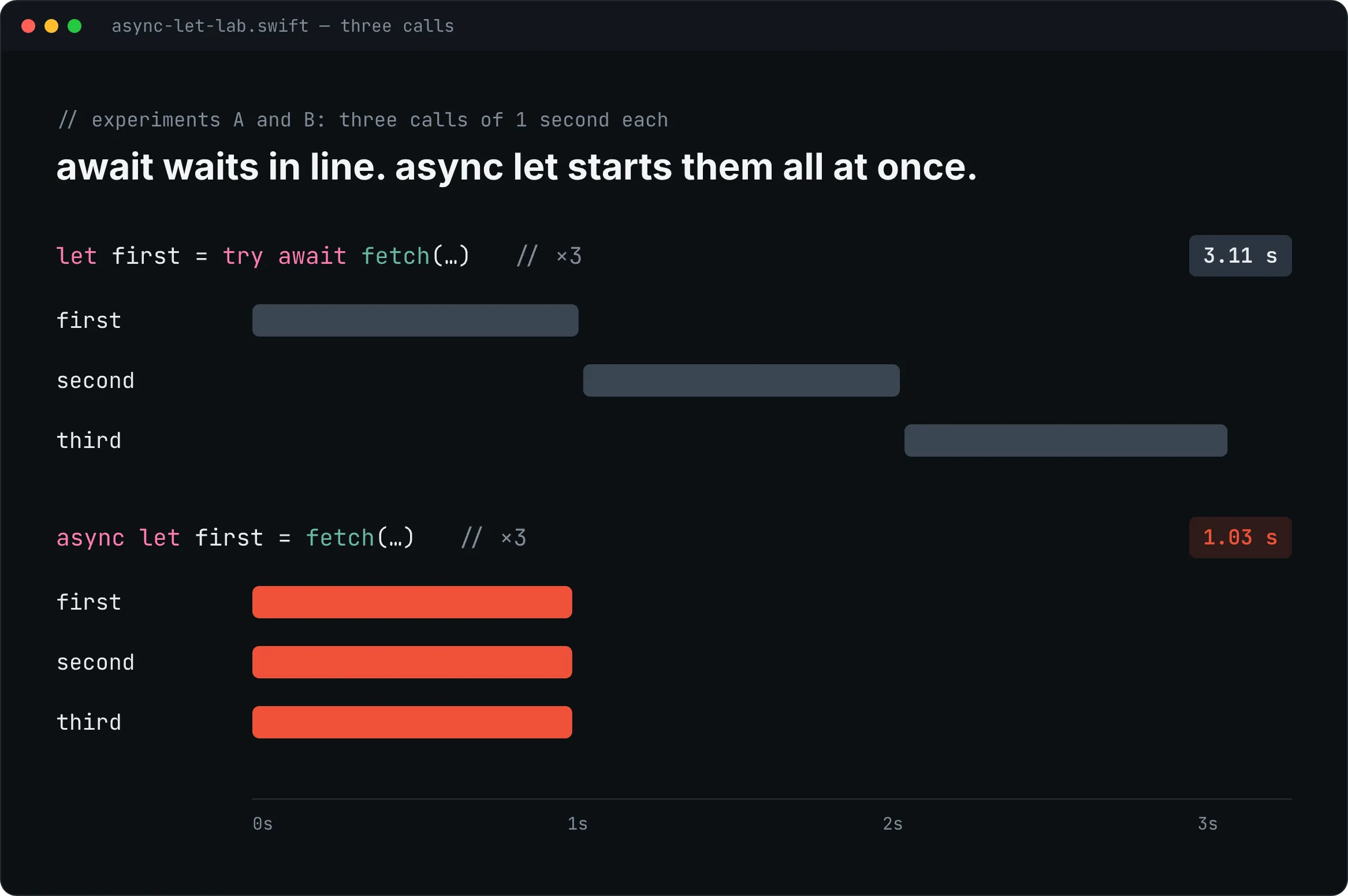
3.11 seconds against 1.03. That one I predicted right.
What I got wrong: I thought async let would at least start them in the order I wrote them, top
to bottom. Not even that. In one run they started first, third, second. They all start, and you don’t
control which one goes first. They don’t depend on each other, so it doesn’t matter, and Swift
schedules them however it wants.
What happens when one of them throws
Next: what if second fails halfway? first takes 1 second, second throws at 0.5, third takes
2.
async let first = fetch("first", seconds: 1)async let second = fetch("second", seconds: 0.5, fails: true)async let third = fetch("third", seconds: 2)
let results = try await [first, second, third]
[0.54s] ‼️ second throws[1.06s] ← first done[1.06s] ✕ third cancelled[1.06s] caught FetchError()second failed at half a second, but nothing happened until a full second later. Why? Because the
error doesn’t reach you when it happens. It reaches you when you await it. The array waits for
first (1 second), then gets to second, and that’s when it throws. At that point, Swift cancels
whatever is still running: third.
And with the real API I saw the other side of it: charmander failed, but mew had already
finished. Cancelling doesn’t undo work that’s already done.
Dad doesn’t leave before his kids
This is the one that made it click for me. Two experiments, almost the same code.
D: an async let that nobody ever awaits. The compiler even warns you about it.
async let forgotten = fetch("forgotten", seconds: 2)_ = try await fetch("quick", seconds: 0.5)// leaving the scopeE: the same thing, but with a Task {}.
Task { _ = try await fetch("escaped", seconds: 2) }_ = try await fetch("quick", seconds: 0.5)// leaving the scopeMy prediction for D: since nobody awaits forgotten, it just gets dropped when the scope ends. For
E: same thing, except nobody would even notice. Like an orphan.
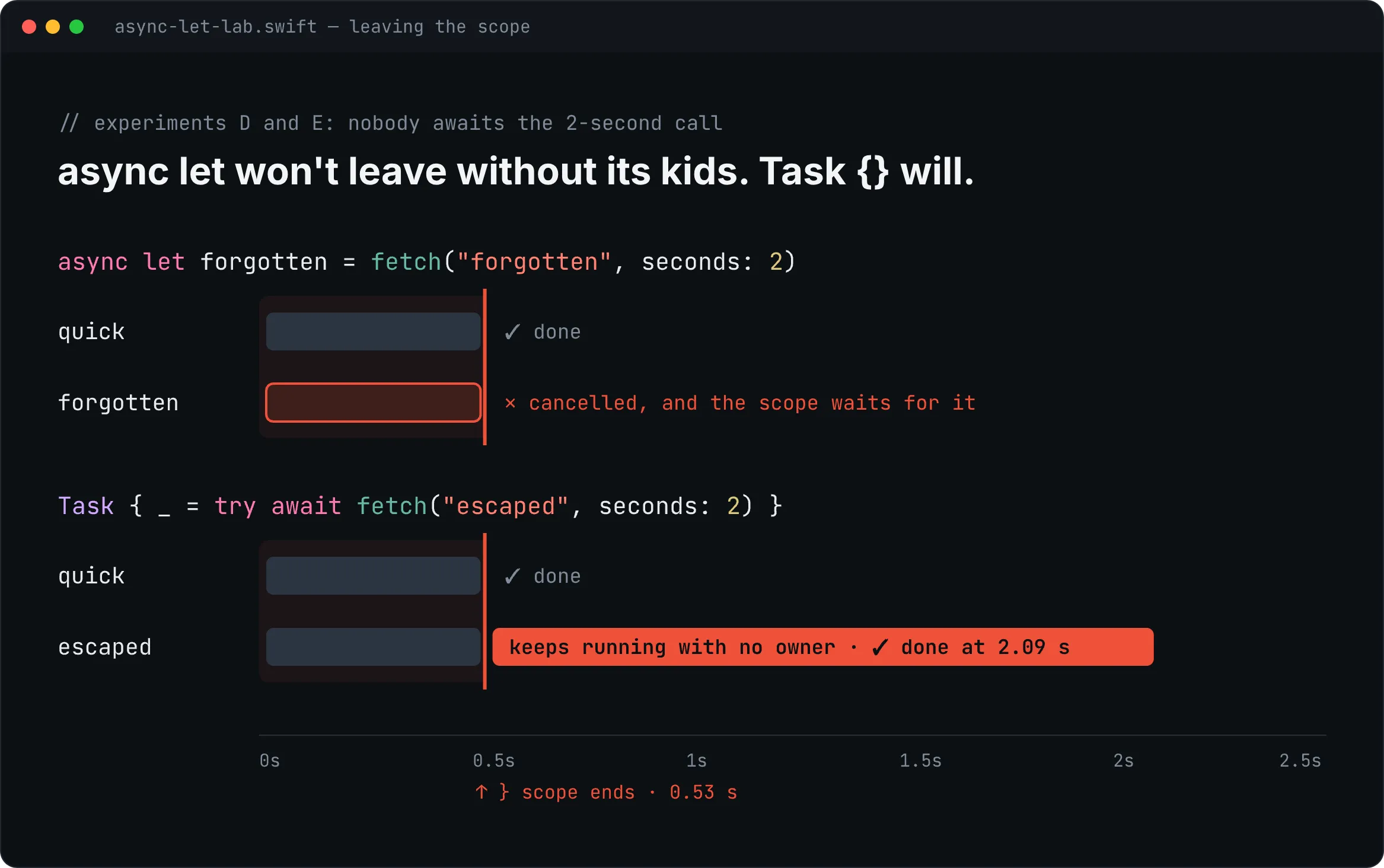
E was right. D was not, and at first I didn’t even notice. I looked at the output and thought: yep,
cancelled, like I said. It took me a second look to see the order. forgotten isn’t dropped: when
the scope ends, Swift cancels it and then waits for it to finish cancelling. The scope never
fully leaves until the child is done. You never wrote await forgotten, and Swift awaited it for
you anyway.
That’s when it started to click. Ahhh, so this is what structured means. A child task lives inside its parent’s scope, and the parent doesn’t finish before its children do. Dad doesn’t leave before his kids. Or, in one line:
async letwon’t leave until its children are cancelled and awaited.Task {}leaves them on their own.
Task {} is an unstructured task. It isn’t tied to the scope that created it, so the parent
leaves and the task keeps running, with nobody waiting for it and nobody to see its errors. (The
compiler warns about that one too, and now the warning makes sense.)
Where it bites: the Task {} that silences the compiler
When I was just learning async/await, with the classic tutorials (yes, those Udemy “Zero to
Hero” ones, haha), the pattern was always the same: a view model method that loads data from an
async repository. Before we even used .task, we used .onAppear in SwiftUI and called it there:
.onAppear { await viewModel.fetchData() // error: 'async' call in a function that does not support concurrency}And to make that error go away… a Task {}, of course. Haha.
.onAppear { Task { await viewModel.fetchData() }}The error goes away, so it feels right. But now that work has no owner. If the user leaves the screen, the request keeps going. If it throws, nobody finds out.
Task {} does inherit some things from where you create it, like the actor and the priority. What
it doesn’t inherit is the lifetime. If you need to cancel it, you have to keep a reference and do
it yourself. In SwiftUI, the .task modifier does that for you: it cancels when the view goes
away.
.task { await viewModel.fetchData()}One more thing that confused me: an async let inside a Task {} is still structured, relative
to that task. Inside every task there’s structure. It’s the Task {} itself that breaks away from
the scope outside it.
The question I ask now
Before I write Task {}, I ask myself: who cancels this? Should this work live and die with
the scope, or do I really want an orphan?
Sometimes the orphan is fine. But now it’s a decision, not a reflex.
I haven’t gone back through my old code yet. What I do now is look for it, even in the PRs my AI generates for me. Remember: it’s a junior, and the judgment is mine.
Next in my notes
This post covers one idea. A few others came up along the way, and each one deserves its own notes:
- The thread pool. Swift manages the threads so we don’t create too many. How that pool works, and how tasks use it, is the next thing I want to dig into.
- Concurrency vs parallelism. Two words that get used as if they were the same. They aren’t, and I want to explain the difference with my own examples.
- The child’s side of cancellation. This post showed the parent’s side: it waits for the child
to cancel. But cancelling is just a signal, and the child’s code has to check it. My fake
fetchstops right away becauseTask.sleepchecks it. If it didn’t, D would have waited the full 2 seconds. TaskGroup. The option for when the number of tasks isn’t fixed.
See you in the next notes.
These are my notes from Antoine van der Lee’s Swift Concurrency Course. The examples, the Pokémon, and the mistakes are mine.